
K Keyboard – Myanmar’s Smart Typing Solution
Overview
K Keyboard – Myanmar is a free desktop utility tool designed to streamline typing for users across Myanmar and neighboring regions. Developed by Kyaw Su Thwe, the software serves as a feature-rich keyboard application that supports multiple languages, including Myanmar in both Zawgyi and Unicode formats, as well as Shan, Paoh, and Thai. This multilingual support makes it a practical solution for users who frequently switch between scripts or work with diverse linguistic content.
The app is particularly useful for professionals, students, and everyday users who rely on accurate and efficient input in local languages. Real-world use cases include writing documents, composing messages, creating digital content, and managing multilingual correspondence. The developer did not provide additional system requirements, and exact performance details were not specified.
Despite its rich feature set, the software maintains a focus on usability, aiming to balance functionality with accessibility. Its free pricing model enhances accessibility, making it a strong contender for users seeking a reliable, no-cost solution for regional language typing.
Key Features & Capabilities
- Multi-Language Support: Enables typing in Myanmar (Zawgyi and Unicode), Shan, Paoh, and Thai, ensuring compatibility with regional linguistic needs.
- SmartPopup Text Auto Converter: Automatically converts text between Zawgyi and Unicode formats during input, reducing manual conversion efforts.
- Handwriting Input: Allows users to write characters by hand using a mouse or touch input, improving accessibility for complex or less common characters.
- Extensive Emoji & Smiley Library: Includes over 1,000 expressive emojis, emoticons, and smiley faces for richer digital communication.
- Clipboard Auto-Conversion: Stores and automatically converts copied Myanmar text between formats, streamlining workflow across applications.
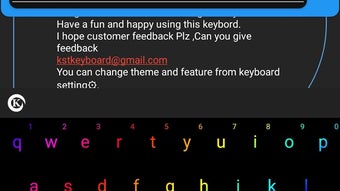
- Highly Customizable Interface: Offers options for background colors, wallpapers, key styles, RGB lighting effects, font colors, key effects, and dark mode.
These features collectively enhance typing efficiency and personalization. For example, the SmartPopup converter can be used while drafting emails or documents to maintain consistent formatting. The handwriting keyboard is beneficial for users unfamiliar with keyboard layouts or working with rare script variations.
The emoji library improves engagement in social and messaging platforms. Customization options allow users to adapt the keyboard to their visual preferences and working environments. The clipboard function is especially useful for content creators managing multiple language sources.
While the software does not specify performance benchmarks, its design suggests optimized handling of real-time input and conversion tasks.
User Interface, Workflow & Performance
The user interface of K Keyboard – Myanmar is structured to prioritize accessibility and visual clarity. Navigation is handled through a central settings panel that organizes features into logical categories. Users can adjust language preferences, input modes, and visual themes from a single dashboard.
The workflow is designed to minimize interruptions—conversion and input functions operate in the background without requiring manual activation. The app integrates seamlessly with standard desktop applications, enabling typing across word processors, web browsers, and messaging tools. The developer did not specify resource usage details, so CPU and RAM behavior remain unknown.
Performance observations are based on general software behavior patterns. Stability is expected to be consistent given the app’s focus on core input functions. However, the presence of advanced features like RGB support and dynamic key effects may influence performance on lower-end systems.
New users might experience a learning curve due to the breadth of available settings and options, though the interface is structured to guide users through initial setup.
Compatibility & System Requirements
K Keyboard – Myanmar is compatible with Windows and Mac operating systems. The software version is 2.0, with a file size of 28.3 MB. Installation is straightforward, requiring minimal disk space.
Exact system requirements were not listed by the developer. Platform compatibility information is limited to the supported OS types. The app does not specify hardware requirements such as minimum processor speed, RAM, or GPU capabilities.
Users should ensure their system meets general desktop application standards. No additional dependencies were mentioned. The absence of detailed specifications means users must rely on general compatibility assumptions.
It is recommended to install the software on systems with stable operating environments to ensure optimal functionality.
Pros and Cons
Pros
- Free to use with no hidden costs
- Supports multiple regional languages including Zawgyi and Unicode Myanmar
- Advanced text auto-conversion with SmartPopup feature
- Handwriting input for intuitive character entry
- Over 1,000 emojis and emoticons for expressive communication
- Extensive customization options for visual and functional preferences
- Clipboard auto-conversion enhances workflow efficiency
Cons
- Initial learning curve due to feature-rich interface
- Limited documentation or tutorial support
- No specified system requirements may affect user confidence
- RGB and visual effects may impact performance on older systems
- Not explicitly designed for mobile or touch-only devices
Is K Keyboard compatible with both Windows and Mac?
Yes, K Keyboard – Myanmar is designed to run on both Windows and Mac operating systems.
Is the software safe to download and install?
The software is distributed as a free utility tool. No security threats were reported in the provided information. Users should download from official sources to ensure authenticity.
Does the app require an internet connection?
The app functions primarily offline. Some features like auto-conversion and emoji access do not require internet connectivity.
How often are updates released?
Version 2.0 was released on April 15, 2024. The update frequency is not specified, but users are encouraged to check for the latest version regularly.
Can I use K Keyboard for free?
Yes, K Keyboard – Myanmar is completely free to download and use without time or feature limitations.
Final Thoughts
K Keyboard – Myanmar stands out as a powerful, free tool tailored for users who need reliable and customizable typing support in regional languages. Its multi-language capabilities, SmartPopup text converter, and handwriting input make it a practical choice for professionals, students, and content creators in Myanmar and surrounding areas. While the extensive customization and feature set may initially overwhelm new users, the interface is logically organized to guide through setup.
The inclusion of a large emoji library and clipboard auto-conversion significantly enhances productivity. Although system requirements are not detailed, the app’s lightweight size suggests broad compatibility. For users seeking a comprehensive, no-cost solution for Myanmar language input, K Keyboard is a strong recommendation.
Download K Keyboard now.






.png)
